Homunculus System
The Homunculus or Homunculi is a special pet which assist Alchemist classes in ways such as a support, an instant partymate, or a sacrifice for the player. Alchemist classes must go through the Bioethics Quest to unlock the appropriate skills required to create a Homunculus. After the quest, the passive skill Bioethics will be available to the player and the rest of the Homunculus skill branch will be available through the distribution of skill points.
Types of Homunculus
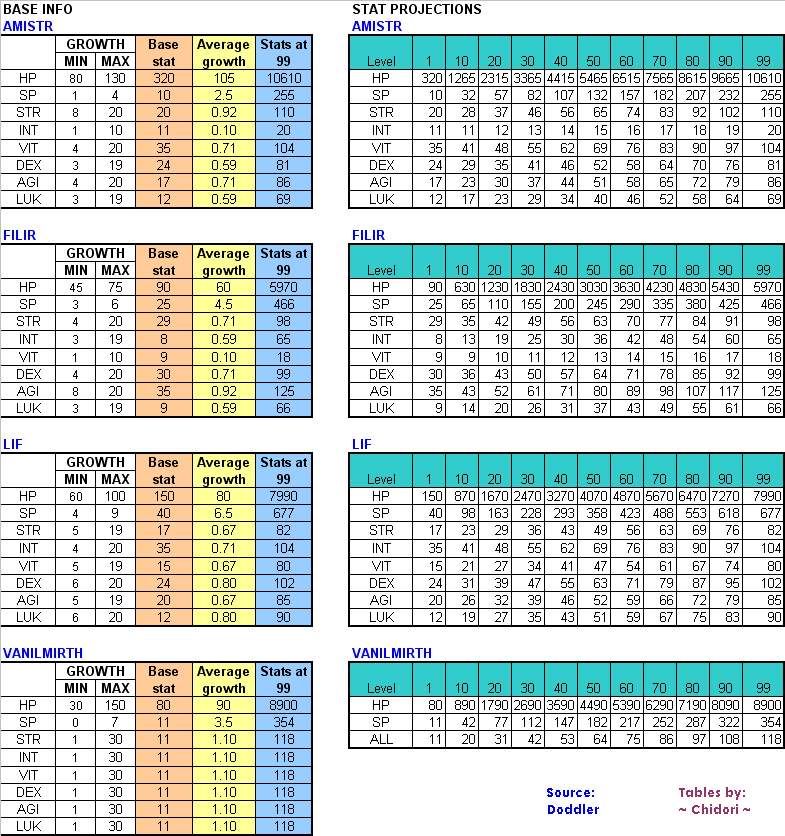
There are 4 types of Homunculi with various attributes unique to each.


Choosing a Homunculus
"Which Homunculus should I pick?" This is a common question amongst new Alchemists and future Geneticists.
Each Homunculus serves its own purpose that is custom tailored to the players' individual needs. Despite general opinion, players should choose based on their exact situation and not what others tell them to do. This is because every player has different leveling methods and amount of time to invest. After the EXP table change homunculus that rely on physical dmg will take too long to level and get enough HIT to be helpful in the grind to 99, Caprice can still work as it doesn't rely on HIT, but damage might not be that great depending on level, you basically have to leech them cause they wont be doing much for quite some time. That being said, homunculus might still be used as a sudo 'tank' of sorts if done properly but requires it being evolved cause evolving gives a lot of HP even at lower levels.
Comparisons
- Lif - more of a novelty character. Its skills are fairly worthless and offer nothing to the player other than a walking speed boost that will be replaced anyways as a Geneticist with Cart Boost. Its attack is low, has no burst attacks, and its healing skill, Healing Hands, does not heal much and is generally not worth using. It is strongly advised NOT to use it as a base, as it generally has no practical use.
- Amistr - generally the best base for a Homunculus S. Its Amistr Bulwark skill is very valuable for MVPing later on as it boosts VIT and even offer some defense that can be useful for PvP. Castling can be very useful to rapidly move around and escape dire situations. Its high base HP can help Homunculus S reach over 200 thousand HP due to scaling.
- Filir - can get high flee which doesn't get reduced by mob amount. The big downside is the lack of VIT, which carries over to Homunculus S. Offensive skills are mostly useless cause not enough hit at the effective levels, Its loyal evolved skill, S.B.R.44, is usually skipped as it is not terribly useful (could be used by spending homunculus tablets, although not recommended).
- Vanilmirth - Best for brewing and possibly leveling before 3rd class. It offers the high VIT and Max HP, has a decent offensive skill. Its Caprice skill can be unreliable, as it picks a random property to use, but one of the only ways to hit higher level monsters. It is a solid choice though for all players to use as a base, and many players skip the loyal evolved skill, Self-Destruction, as it is not used very often. It is also desirable as a base for a Homunculus S, for players who plan on becoming pure brewers, because Instruction Change increases the brewing success rate.
Obtaining a Homunculus
- Main article: Potion Creation
To obtain a Homunculus, an Embryo is required. These can be purchased from other Alchemists or can be self-made. In order to make an Embryo, an Alchemist must use the skill Prepare Potion with the following materials purchasable from the Al de Baran Material Seller, in the Alchemist Guild :


Success rates of creating embryos are affected mainly by the Alchemist's INT, DEX and LUK.
Once an Embryo is obtained, use the skill Call Homunculus to summon a new Homunculus. There is a chance to get 1 of the 4 base Homunculi and another chance to get 1 of the 2 sprites available to each type of Homunculus. Although not completely proven, there is a popular "fact" that the creator of the Embryo's stats play in a role in the probability of summoning each Homunculus.
Homunculus Stats and Skill Points

Homunculus have their own set of stats apart from their masters, these will have a set amount upon summoning and will vary as it levels up. With each level, a Homunculus will receive a certain amount points to each stat (STR, AGI, VIT, INT, DEX, LUK) depending on which type of Homunculus. These stats are invisible under the Homunculus Stat Window (Alt+R). The Homunculus's ATK, MATK, Hit Rate, Critical Hit Rate, DEF, MDEF, Flee Rate, and ASPD will be visible. The Homunculus also gains one skill point for every three levels. Unlike status points, one can apply these to whichever skill one would like.
To calculate the Homunculus' stats, use the following equations:
ATK  = Floor((STR + DEX + LUK) ÷ 3) + Floor(Level ÷ 10)
MATK = Level + INT + Floor((INT + DEX + LUK) ÷ 3) + Floor(Level ÷ 10) × 2
HIT  = Level + DEX + 150
CRI  = Floor(LUK ÷ 3) + 1
DEF  = (VIT + Floor(Level ÷ 10)) × 2 + Floor((AGI + Floor(Level ÷ 10)) ÷ 2) + Floor(Level ÷ 2)
MDEF = Unknown
FLEE = Level + AGI + Floor(Level ÷ 10)
ASPD = Unknown
Intimacy
Feeding and Intimacy
Much like pets, Homunculus require feeding. Feed the Homunculus when its hunger is between 11~25 to get 1 full point of Intimacy. Feeding at the other times will give less than a full point and may even reduce the Intimacy. If one forgets to feed the Homunculus, its Intimacy will eventually decrease, and it will leave the master if it goes below zero Intimacy.
| Hunger | Intimacy |
|---|---|
| Starving at 1% ~ 10% | -1 |
| 1% ~ 10% | 0.5 |
| 11% ~ 25% | 1 |
| 26% ~ 75% | 0.75 |
| 76% ~ 90% | -0.05 |
| 91% ~ 100% | -0.5 |
The homunculus also display emotes as a way of warning the player. The emotes used are:
| Status | Emote |
|---|---|
| Hunger below 11% |  * *
|
| Player feeds without proper item | 
|
| Player feeds at 1% ~ 75% | 
|
| Player feeds at 76% ~ 90% | 
|
| Player feeds at 91% ~ 100% | 
|
| Failed to use skill | 
|
| Failed to evolve | 
|
Intimacy is crucial for evolution, obtaining the final skill, and AFKing. Intimacy has not been proven to affect Homunculus' stat growth. This value is not shown in the Homunculus Stat Window. However, for each interval of Intimacy points the Homunculus has, the window will show:
| Intimacy | Status |
|---|---|
| 1 ~ 3 | Hate with Passion |
| 4 ~ 10 | Hate |
| 11 ~ 100 | Awkward |
| 101 ~ 250 | Shy |
| 251 ~ 750 | Neutral |
| 751 ~ 910 | Cordial |
| 911 ~ 1000 | Loyal |
Manipulating Intimacy
The player dying, the Homunculus dying, or the Homunculus vaporizing does not affect Intimacy. Stressing it (other than using their ultimate skills) is the only way that to lower its Intimacy. One can stress the Homunculus by not feeding it (Hunger < 11) or overfeeding it (Hunger > 75).
Each hour of starving causes the Intimacy to decrease by 18 (3600 seconds per hour / 200 seconds per loss). If the player is away from the computer for a full 24 hours of starving, the Homunculus' Intimacy will decrease by 432. If the player can no longer use Call Homunculus or Homunculus Resurrection, then the Homunculus has left its master for good. However, the master is able to create a new Homunculus.
Homunculus Tablets
With Potion Creation, Alchemist can create Homunculus Tablet that will increases Homunculus intimacy by 50 when used. Requires:


Evolution
When the Homunculus' Intimacy is Loyal, use a Stone of Sage (simply double click it) to evolve it. There is no level condition in order to evolve it. With evolution, the Homunculus will obtain a random bonus for each of its stats, increased Max HP and Max SP, a new form, and a fourth, new skill is unlocked.
After evolving, the Homunculus' Intimacy resets to 10 (Hate).
Controlling the Homunculus
Manual Functions
Here is a listing of all manual functions with the Default AI. In general, there will be no need for any other manual functions in most Custom AIs.
- Alt + Single Right Click: Target monster
- Alt + Double Right Click: Attack monster
- Alt + T: Standby, Idle/Passive mode, cancels all commands and returns to master
- Alt + Right Click Ground: Move to location (15 tile range)
- Alt + R: Information window
If the player is dead, manual commands can't be issued. However, the AI will continue to function as normal.
AI
The AI is the "brain" of the Homunculus. All Homunculus behavior is controlled by an AI script. There is a choice between the use of the default script or a custom script. The default script is both poorly made and simple; the primary problems with the default script are that the Homunculus will either kill steal everything (default AI'ed Vanilmirth and Filir) or will not attack anything at all (default AI'ed Amistr and Lif). Hence it is recommended to write a custom script or use a premade one made by users. To switch between the Default AI and the customized User AI, use the /hoai command. It can also be switched in the Ragnarok Setup program by checking/unchecking the hoai checkbox in the Option tab.
Installing AI
The majority of homunculus users at iRO use the Azzy AI script. Once an AI script is downloaded, go to the default RO directory. This is generally located at C:\Program Files\Gravity\Ragnarok Online\AI. Insert the downloaded AI script into the USER_AI folder and relog or resummon the Homunculus. This should be done every time there is a change in script. While there are infinite possibilities with AI scripts, it is necessary to understand that there are things it can and cannot do. These limitations are what separates it from bots.
Possibilities
- Autocasting Homunculus buff skills.
- Auto Feeding.
- Different tactics for individual monsters (ex: what priority to attack, using a skill on that monster, etc).
- Reading the HP, SP, MAXHP and MAXSP values of the Homunculus or its owner.
- Reading the target of a attacking monster (to avoid kill stealing).
- Reading the current animation or "motion" other actors are doing (this is buggy when used on the Homunculus itself).
- Automatically shut down the Ragnarok Online client using
os.exit().- If the owner is being attacked, it logs out after 5 seconds after calling
os.exit(). Otherwise it will log out immediately afteros.exit()is called. - This may not work on Windows 7 and later, instead producing an error message and hanging the client, but not logging the user out until they click through the error or the server times out the connection.
- If the owner is being attacked, it logs out after 5 seconds after calling
Impossibilities
- Automatically attacking monsters within player's sight range.
- Autocasting Homunculus offensive skills.
- Detecting whether other players are in a party with the owner.
- Detecting who the owner of another Homunculus is (
GetV(V_OWNER, id)returns the owner's ID, regardless of what the second argument is). - Detecting status effects or ground effects.
- Identifying skills used, or gathering any other information not listed above.
- Locating hidden players.
- Auto Looting.
- Using skills while their owner is vending.
- Maintain its AI when the Homunculus is out of range of their owner.
- Having the owner move around (except when autocasting the Castling Skill).
- Reading the HP, SP, MAXHP and MAXSP values of someone other than the Homunculus or its owner.
- Autocasting any player skills (Disabled after 5-Feb-2008).
Not Allowed
- Using a 3rd party program.
- Reading in real time the output of the Homunculus TraceAI function, so that one gains a read out on what is around the player (including things that the game client won't show). According to a GM post on the iRO Forums:
- "Doing this when monster leveling would not be such a big deal but in PVP/WoE purposes it is a very unfair/unintended thing. Users violating that rule will be suspended."
- Feeding the Homunculus or moving the owner around using a 3rd party program.
- Players are responsible for the actions of their Homunculi. For example, if the Homunculus kill steals people, then the player is held accountable and may be punished accordingly.
Experience and Leveling
General Information
The level limit for a Homunculus owned by an Alchemist or Biochemist is 99. Once its master is promoted to Geneticist, the level limit is increased to 175. However, allowing a Homunculus to level higher than 99 is not recommended, as it will gain less HP/SP and stats compared to a Homunculus S, so it is advised to keep the Homunculus Vaporized until after completing the Homunculus S quest.
If a player kills a monster with a Homunculus summoned, the player gets 90% of Base and Job Experience from the monster, while the Homunculus get 10% of Base and Job Experience from the monster.
Whenever the player dies and the Homunculus' HP is above 80%, it will automatically be Vaporized. Otherwise it will not vaporize and is able to continue to fight, and the player continues to receive Experience from Homunculus, but manual commands cannot be issued.
Experience Chart
- EXP table for Non-iRO and pre-Homunculus Update iRO please check Previous Homunculus EXP Table
|
|
|
| ||||||||||||||||||||||||||||||||||||||||||||||||||||||||||||||||||||||||||||||||||||||||||||||||||||||||||||||||||||||||||||||||||||||||||||||||||||||||||||||||||||||||||||||||||||||||||||||||||||||||||||||||||||||||||||||||||||||||||||||||||||||||||||||||||||||||||||||||||||||||||||||||||||||||||||||||||||||||||||||||||||||||||||||||||||||||||||||||||||||||||||||||||||||||||||||||||||||||||||||||||||||||||||||||||||||||||||
Miscellanea
- They gain a skill point for every three levels. There is no Job Level equivalent.
- They obtain additional EXP from Spotlight, increased server rates, Battle Manuals, or EXP increasing gear and cards.
- Their Flee rate and Defense is not reduced by the number of monsters.
- Their Hit Rate is capped at 95%. Even if it has way more hit than required for a monster, it will always miss at a 5% chance.
- All Homunculi have a base Attack Speed of 1.4 seconds per attack (ASPD 130). Different stat growths lead to different attack speeds of each Homunculus.
- Homunculus' stat growth is random, nothing will affect which stats will grow and which stats will not.
- Homunculus can hit Ghost property monsters.
- Other players can't Heal homunculus, but Sanctuary heals them
- Homunculus movement speed follows the owner's condition when he/she summons it, revive it, or moving map zones. If A Geneticist is under Cart boost the homunculus will also move fast, same when the player get Decrease Agility.
Need confirmations from other players about buff. Some buffs can be casted on homunculus but it's not clear they're affected or not or have similar restriction like Mercenaries
Known Bugs
- The Homunculus stat window is now bugged, many of the stats do not represent real values. For instance, ATK is much lower than its actual value.
- The Vanilmirth's Instruction Change skill is bugged and only adds the STR and INT when it levels up. If the player leaves the map, Vaporize, Summon, or resurrect the Homunculus, the bonus will be lost. Teleporting does not cause the bonuses to be lost.
- After Amistr's Castling skill, monsters do not always change target.
- If the Homunculus was vaporized or killed with a status effect, it will bug up. (It will get immobilized, vanish and it will get the grim reaper, like the one while affected by Curse. Use Vaporize and Call Homunculus to fix this bug).
- Homunculus can have permanent Movement Speed increase until one relogs, changes map, teleports, or Vaporizes. It is possible while using Call Homunculus and an item, skill or gear that increases Movement Speed, such as Speed Potion, Increase AGI, Cart Boost or Bloody Axe at the same time.
- Both the Homunculus Hunger countdown clock (1 minute timer) and the starvation clock (20 seconds timer) will reset if one relogs, changes map, teleports, or uses Vaporize and Call Homunculus together.
- On iRO, all Homunculus races have been changed to Demi Human for balancing reasons. However, the alternate form of the Vanilmirth is still considered Formless and not Demi Human. Therefore, all Demi Human reductions do not apply versus alternate Vanilmirths. In addition, the Battlegrounds equipment set penalties (damage received is tripled versus non Demi Human monsters) apply for the alternate Vanilmirth because it is not considered Demi Human. This does not apply to Homunculus S, which have the same races that they do on other RO's, because this balancing was seen as unnecessary, now that people do not use Battlegrounds sets.
Changelog
- February 3rd, 2020
- Max level increased from 150 to 175.
- Experience table changed.
- Homunculus will now always gain 10% of the final experience gained by the owner, irrespective of how much damage the homunculus dealt to the enemy.
- Auto-feeding system implemented.
- Homunculus can no longer attack monster automatically. To attack a monster, the owner must order it manually by Alt + Right Click.
- October 13th, 2022
- Homunculus duration reduced from permanent to 1,800 seconds.
See Also
External Links
| Homunculus & Homunculus S | ||
|---|---|---|
| Homunculus Skills | Amistr | Adamantium Skin • Amistr Bulwark • Blood Lust • Castling |
| Filir | Accelerated Flight • Flitting • Moonlight • S.B.R.44 | |
| Lif | Brain Surgery • Healing Hands • Mental Charge • Urgent Escape | |
| Vanilmirth | Caprice • Chaotic Blessings • Instruction Change • Self-Destruction | |
| Homunculus S Skills | Bayeri | Angriffs Modus • Goldene Ferse • Heilige Stange • Stahl Horn • Stein Wand |
| Dieter | Granitic Armor • Lava Slide • Magma Flow • Pyroclastic • Volcanic Ash | |
| Eira | Eraser Cutter • Light of Regenerate • Overed Boost • Silent Breeze • Xeno Slasher | |
| Eleanor | C.B.C (Continual Break Combo) • E.Q.C (Eternal Quick Combo) • Midnight Frenzy • Silvervein Rush • Sonic Claw • Style Change • Tinder Breaker | |
| Sera | Needle of Paralyze • Poison Mist • Pain Killer • Summon Legion | |
| Alchemist's Skills |
Bioethics • | |
| Leveling | |
|---|---|
| Levels | Experience • Base Level (Base EXP Chart • Base EXP Quests) • Job Level (Job EXP Chart • Job EXP Quests) • Party System • Guild Level • Homunculus Level (S-Type) |
| Leveling Methods | Adventurer's Guild • Bounty Board Quests • Eden Group Leveling Quests • Daily Quests • Leveling Spots • EXP Quest Table • Weekly Turn-In Events (Gramps) |